
Migration Guide: Publishing Your bookdown Book to Posit Connect Cloud
Source:vignettes/articles/bookdown-org-migration-guide.Rmd
bookdown-org-migration-guide.RmdThis guide provides step-by-step instructions for migrating your bookdown project from the retiring bookdown.org hosting service to Posit Connect Cloud. Posit Connect Cloud is the recommended alternative for hosting your bookdown content, offering robust deployment, sharing, and management features.
Prerequisites
Before starting the migration, ensure you have the following:
A Posit Connect Cloud Account: Sign up or log in to your Posit Connect Cloud account.
-
R and Required Packages: Ensure the bookdown and rsconnect packages are installed and up to date in your R environment. You need version bookdown 0.46 or later and rsconnect version 1.6.0 or later, both of them available from CRAN.
# Install/update necessary packages
install.packages(c("bookdown", "rsconnect"))
# using pak
pak::pak(c("bookdown", "rsconnect"))
Local bookdown Project: You must have the source files for your bookdown project on your local machine. If you don’t have the source, you don’t need this guide. See the FAQ.
If you want to learn more about Connect Cloud before starting your migration, see its documentation.
TL;DR: Run bookdown::publish_book()
In bookdown 0.46, we updated
publish_book() to prompt you to connect to Connect Cloud
and deploy your book version, just as it was the case when deploying to
bookdown.org.
To switch to publishing to Connect Cloud, the only thing you have to do is
bookdown::publish_book()This will
- Remove bookdown.org from rsconnect’s known server
list (i.e.
rsconnect::servers()) and from your accounts (i.e.rsconnect::accounts()) - Prompt you to connect to https://connect.posit.cloud (i.e. call
rsconnect::connectCloudUser()for you) - Deploy your bookdown book (using
rsconnect::deploySite())
As with bookdown.org, only the static version of your book will be
deployed, meaning the bookdown book needs to be rendered locally first,
and be present in your bookdown output directory (e.g. default
_book directory). If you have not already rendered the
book, add render = 'local' to the command, which will
render it before uploading:
bookdown::publish_book(render = 'local')Now go to your Connect Cloud account to see your book online!
Detailed Steps to Publish Your Bookdown Book
1. Prepare Your Project for Deployment
If you were publishing to bookdown.org, you probably added some
specific YAML field in your index.Rmd like
description: "This is a minimal bookdown demo. It shows the basics of ..."
github-repo: "rstudio/bookdown-demo"
cover-image: "images/cover.png"
Those fields were used for listing on bookdown.org and can now be removed as they are no longer needed for Connect Cloud publishing, as there will be no listing.
They won’t prevent or impact deployment if they are still there.
All other configurations for bookdown should stay.
2. Configure rsconnect for Posit Connect Cloud
The rsconnect package manages the connection and
deployment process.
To add a connection to https://connect.posit.cloud, use:
rsconnect::connectCloudUser()This needs to be run interactively, as it will open a browser and prompt you to confirm a code.
Note: The bookdown package (version 0.46 or
later) is updated so that running bookdown::publish_book()
will prompt you to connect to Posit Connect Cloud if you don’t have any
existing Connect accounts configured.
3. Deploy Your Book
You can deploy your book using
bookdown::publish_book()
- Navigate to Project Directory: Ensure your R session’s working directory is the root of your bookdown project.
-
Run Deployment Command: Use the
bookdown::publish_book()function.
# Renders the book locally before deployment (recommended)
bookdown::publish_book(render = "local")
# Set a custom name at publishing (Defaults is `book_filename` in `_bookdown.yml` if not specified.)
bookdown::publish_book(name = 'name of the book', render = "local")
If you have only one account configured, rsconnect
will deploy using that account. If you have multiple, you may be
prompted to choose. Or, you can specify account and/or
server, which will be passed to
rsconnect::deploySite() .
4. Manage Your Published Book on Connect Cloud
Once deployed, your book will be accessible on Posit Connect Cloud.
- View the Book: A link to your newly published book will appear in the console or your browser.
-
Settings and Sharing:
- Log in to Posit Connect Cloud and navigate to your book’s landing page.
- You can manage access settings based on your plan. (e.g., public, private, specific groups).
- You can set a custom URL (also known as a vanity URL) for your book within the Connect Cloud domain.
See Connect Cloud User Guide for more information: https://docs.posit.co/connect-cloud/user/
FAQ
Q: What is the recommended alternative for hosting my book?
The recommended alternative, especially for users who want a simple deployment experience and enterprise-grade hosting, is Posit Connect Cloud. Alternatives also include hosting on services like GitHub Pages or Netlify.
Q: Will my book’s URL automatically redirect from bookdown.org?
No. Users are responsible for migrating their own content. However, Posit will offer a redirecting service upon request. Active bookdown.org users will receive an email with information on how to request a redirect for your book. You will need to have already migrated your book to an alternative hosting service, so that you can supply the new hosting location (e.g., your Connect Cloud URL).
Q: Do I need to make any code changes to my Rmd files?
Generally, no. The deployment process via bookdown::publish_book() is compatible with existing bookdown projects. As there is no listing service anymore as with bookdown.org, you can even remove specific YAML fields that were used for bookdown.org listing. See 1. Prepare Your Project for Connect Deployment
Q: What happens to my book on bookdown.org after the sunset date?
You may download and delete your existing content until January 15, 2026. On January 31, 2026, the site transitions to a read-only archive, and all publishing functionality will cease. Your content will remain viewable in this archived state until January 31, 2027. After this date, the site will be fully decommissioned, and all content will be permanently inaccessible.
Q: Do I need to use bookdown::publish_book()?
No, you don’t. This function is provided for convenience for bookdown users. You can use the rsconnect package directly, or follow one of the other publishing methods offered by Connect Cloud, like deployment from GitHub or deployment from your IDE
Q: Is Connect Cloud free like bookdown.org was?
Yes. Connect Cloud has a free tier that includes an unlimited number of published documents. It also offers paid plans with functionality that bookdown.org did not offer. See https://connect.posit.cloud/plans for more details.
Q: Are books on Connect Cloud publicly available?
Yes, any content on Connect Cloud is publicly available on the Free Plan. This is similar to bookdown.org public hosting service. To disable public sharing or share with selected viewers, an upgraded plan is required. See docs.posit.co/connect-cloud/user/share
Q: Can I get a vanity URL like with bookdown.org?
Yes, it is possible to customize the URL of your content by setting a
custom name in the settings page of the content. URL would then be of
the form
https://[account-name]-[custom-name].share.connect.posit.cloud.
See Connect
Cloud documentation on settings
Q: Can I publish my bookdown project to Connect Cloud from GitHub?
Yes, you can, with some adaptation to your current workflow if you
were using publish_book(). Because
rsconnect::connectCloudUser() can only be run
interactively, you can’t use publish_book() to push to
Connect Cloud from within a GitHub Action workflow. However, Connect
Cloud provides a GitHub integration that enables you to directly connect
your repository and automatically publish on push, or manually refresh
from the Connect Cloud Dashboard, without the need to maintain a GitHub
Actions workflow in your project that pushes to Connect Cloud. See https://docs.posit.co/connect-cloud/user/publish/github.html
There are several options available, depending on your desired workflow.
-
If you commit your rendered book output to GitHub (e.g., the
_bookdirectory), then you can use the Static Document deployment Static Deployment Icon on the Connect Cloud publish page
When configuring this deployment, select the rendered index.html as the Primary file. Example:
 Screenshot showing selection of “_book/index.html” as Primary file for deploy on Connect Cloud
 -
If you don’t want the rendered book in your main branch with source, you can also commit the rendered book in another branch, and select that branch in the Static Document configuration. For example:
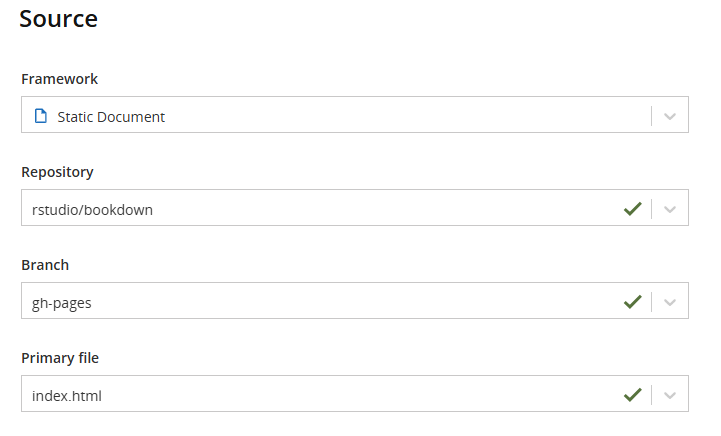 Screenshot showing Source configuration for automatic deploy on Connect Cloud using gh-pages instead of main and selecting index.html as Primary file
Both of these options deploy the rendered book as Static Document deployment. This allows you to render locally, commit, and push, or have a GitHub Action build your book and do the commit.
The last option is to have your book rendered on Connect Cloud. See below Q: Can I have my book rendered on Connect Cloud?.
Q: Can I have my book rendered on Connect Cloud?
Yes, your bookdown project can be rendered on
Connect Cloud instead of in your local R environment. For that, you will
need to add a manifest.json file so that Connect Cloud can restore your
R environment. For a bookdown book, use
contentCategory = "site":
rsconnect::writeManifest(contentCategory = "site")See more details Connect Cloud R guide.
Once you have a manifest.json file, you have two
options:
-
Use Connect Cloud’s GitHub integration to have your source code pulled directly from your GitHub repository, either manually triggered from the Connect Cloud dashboard or automatically upon pushing to a branch. For that, you need to create a new deploy and select R Markdown as your framework
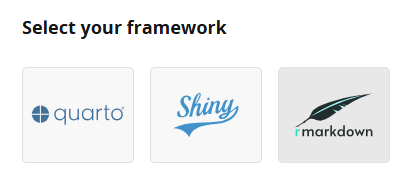
This will allow you to keep only the source of your book in GitHub, not the rendered HTML, and have it rendered on the Connect Cloud server.
-
Keep using the
publish_book()function locally while settingrender = "server"bookdown::publish_book(render = "server")
In both cases, your book will now be rendered on the Connect Cloud server.
If you require a specific configuration for rendering your document, such as environment variables, refer to the Connect Cloud documentation.
Q: I don’t want to migrate, but I want to download my current book hosted on bookdown.org. Can I do that?
bookdown.org is based on a Connect server, and if you have published content to it, you can access your dashboard to view and download your content.
This needs to be done before January 31, 2026, following these steps:
Go to https://bookdown.org/connect/ and click login (you may be redirected back to bookdown.org - if so, follow step two)
Once logged in, go to https://bookdown.org/connect/
-
Select your content, and click “source versions”
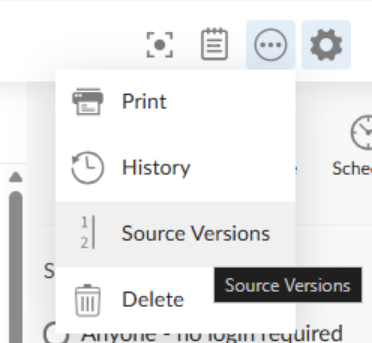 Screenshot of bookdown.org connect menu to download source
 -
Then select the source you want to download and click download
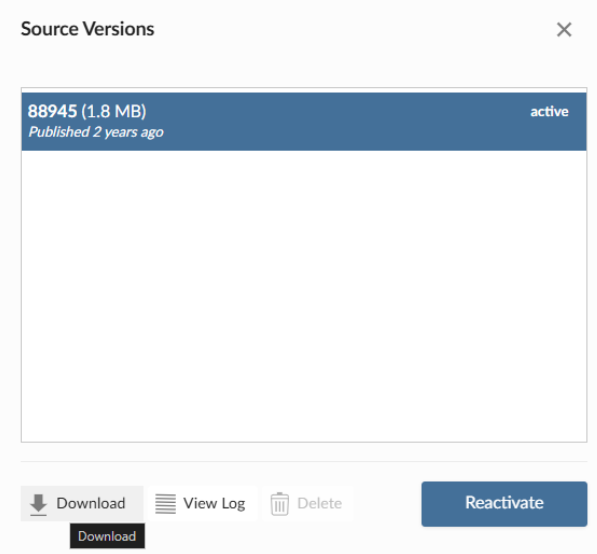 screenshot of source versions dialog box in bookdown.org to download source bundle
If you prefer, you can do that programmatically, using the
connectapi package. See
connectapi::download_bundle(). An API key is required in
that case - see connectapi’s
“Getting Started” article
This method of downloading books will no longer be available after January 31, 2026.
Q: I don’t have my bookdown project sources, but I have the rendered HTML. Can I publish it?
Yes. bookdown::render_book() has produced for you at the
time a static website, and it can be hosted anywhere that supports such
content. It can be deployed to Connect Cloud, but you could also
consider Netlify, GitHub Pages, or any other static page hosting
service. Below, we are guiding you to republish on Connect Cloud.
Connect Cloud can host static content. You can use the Connect Cloud
website to configure or use the rsconnect package to
deploy it. bookdown::publish_book() won’t be adapted.
To deploy a folder of static HTML to Connect Cloud using rsconnect:
# First, authenticate with Connect Cloud (one-time setup)
rsconnect::connectCloudUser()

# Deploy your static HTML folder
rsconnect::deployApp(
  appDir = "path/to/your/html/folder",  # folder containing index.html
  appName = "my-book-name",             # URL-friendly name
  appTitle = "My Book Title",      # Optional title, otherwise appName.
  appMode = "static",
  contentCategory = "site",
  server = "connect.posit.cloud" # should be the default one used.
)
To download a bundle of your previously deployed book to bookdown.org, see Q: I don’t want to migrate, but I want to download my current book hosted on bookdown.org. Can I do that?
Or you can use the connectapi package, but it requires
getting an API
key:
# Set your bookdown.org API key (get it from https://bookdown.org/connect/)
Sys.setenv(CONNECT_API_KEY = "your-api-key")

client <- connectapi::connect(server = "https://bookdown.org")
content <- connectapi::content_item(client, guid = "your-app-guid")
connectapi::download_bundle(content, filename = "my-book.tar.gz")

# Extract
untar("my-book.tar.gz", exdir = "my-book")
Then you can use rsconnect::deployApp() as above.
Q: I don’t want my content to be in the read-only version of bookdown.org for 2026. How do I delete my content currently published on bookdown.org?
To remove your content, you can follow these steps:
Go to https://bookdown.org/connect/ and click login (you may be redirected back to bookdown.org - if so, follow step two)
Once logged in, go to https://bookdown.org/connect/
-
Select your content
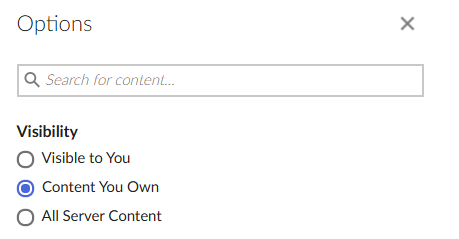 screenshot of filter for its own content on the connect dashboard page in bookdown.org
 -
On the content settings page, click delete on the settings
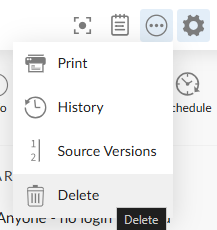 screenshot for menu in the content page to click delete
 -
Validate
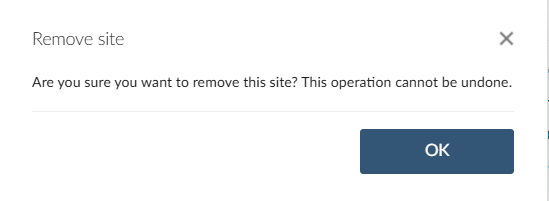 screenshot of modal validation when deleting content on bookdown.org
Q: I still need to update my content on bookdown.org. Can I do that?
Yes, you can still update your content until January 15, 2026.
However, as mentioned in this migration guide, in version 0.46 of
bookdown, bookdown::publish_book() won’t allow publishing
to bookdown.org anymore.
So if you need to update your content, the easiest is not to update
bookdown yet. Use version 0.45 or below.
If you need to install 0.45, you can use the Posit Package Manager frozen
repo using the following command:
install.packages("bookdown", repos = "https://packagemanager.posit.co/cran/2025-12-02")Another option is to use rsconnect package:
# If you got bookdown.org server removed
rsconnect::addServer("https://bookdown.org/__api__", "bookdown.org")
rsconnect::connectUser(server = "bookdown.org")

# deploy your book
rsconnect::deploySite(siteDir = getwd(),server ="bookdown.org")
This method of updating books will no longer be available after January 15, 2026.